Fofi - Fun AI Pet Effects
- 3.9
- Rating
- 100.00K
- Installs
- Free
- Price

 Analysis by App-foxy
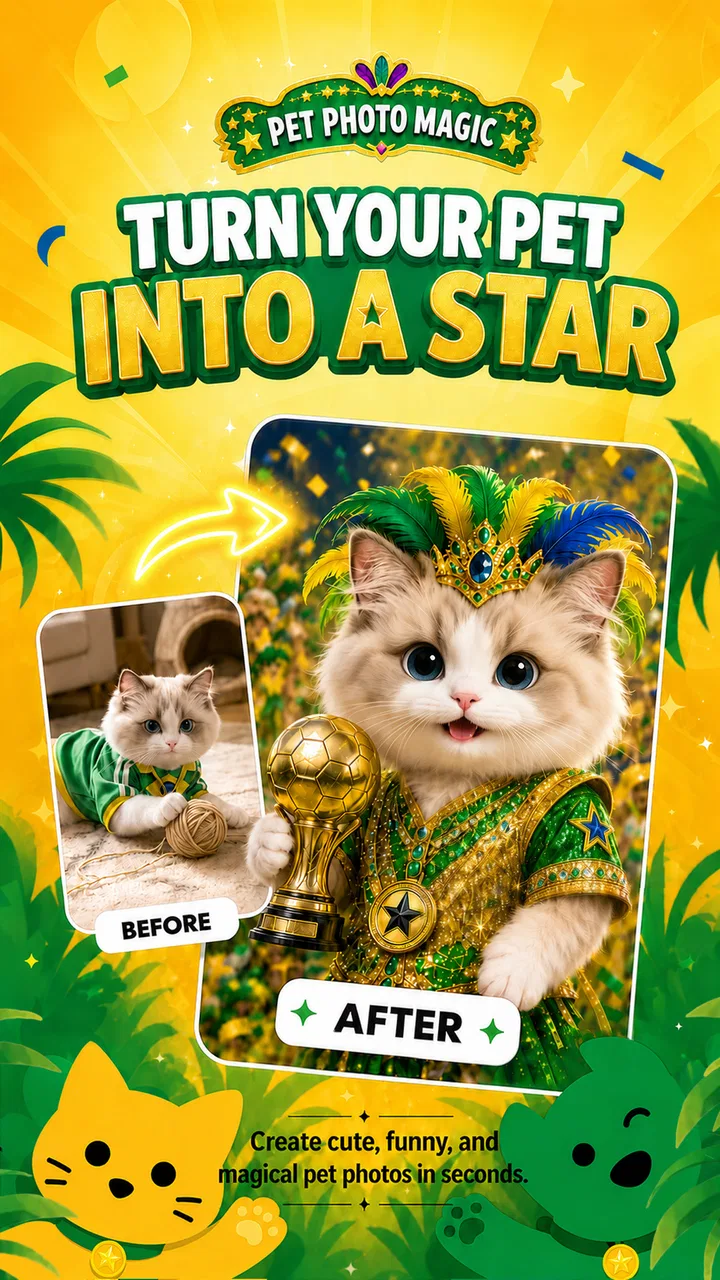
I approached Fofi - Fun AI Pet Effects as a lighthearted video and photo editor rather than a full production suite, and that distinction matters. Its appeal is immediate: take a picture or clip of a pet, add a playful treatment, and turn an ordinary moment into something worth sending to friends. The idea is simple, but it works best when you want quick entertainment instead of detailed manual editing.
My overall impression is that Fofi is most enjoyable when you treat it as a creative toy with a clear purpose. It is not the app I would choose for carefully controlled color correction, serious social-media production, or professional video work. I would choose it when my goal was to make a dog look amusing in a costume-style scene, give a cat a more animated personality, or create a short shareable clip without spending a long time learning an editor.
What using Fofi feels like in everyday life
The app comes from Sparking Innovations Limited and sits in the video players and editors category. It is free to install, with optional purchases ranging from $0.99 to $6.99 per item. That makes it easy to try without committing money first, although anyone who enjoys experimenting should pay attention when extra creative options are offered inside the app.
You May Also Like

 Blood Strike: 2.5 Anniversary
Blood Strike’s Loadouts Turn Every Drop Into a Tactical Gamble
A close look at Blood Strike’s custom loadouts: how fast access to signature weapons reshapes its battle royale rhythm, rewards preparation, and narrows the gap between fights.

 Pandora - Music & Podcasts
Pandora’s Music Is Easy to Start, but Harder to Recover
Pandora’s strength is its low-effort path from a seed to a station. Its weak spot is how much confidence it asks you to place in connection, setup, and quiet recovery.

 8 Ball Pool
 Is Built on Rivalries, Rematches, and Routine
A close look at the rivalries, rematches, shared routines, and unanswered safety questions that turn a quick pool match into a persistent mobile community.

 Samsung Music
’s Quiet Strength Is Playing What You Already Own
Its reach comes less from spectacle than from dependable access to a personal library. That simplicity is both the app’s strongest retention engine and its ceiling.

 AccuWeather: Weather Radar
AccuWeather Review: A Quick, Clear Forecast for Everyday Decisions
For everyday plans, the best forecast is the one you can understand quickly. AccuWeather makes rain timing, radar, and local conditions easy to act on, with a few trade-offs.

 Hill Climb Racing
Why Hill Climb Racing Still Turns Crashes Into One More Run
A tiny car, a bumpy hill and one more upgrade: Hill Climb Racing keeps resurfacing because its simple chaos makes every near-miss feel personal.
More From Our News Desk
View All News


In practical use, the best starting point is a clear image of a pet with the subject easy to recognize. A well-lit portrait, a front-facing expression, or a short clip with the animal reasonably centered gives the effects a better chance of looking convincing. A dark photo, a busy background, or a pet moving quickly can make the result feel less polished, so the quality of the original media has more influence than a new user might expect.
I found the concept especially suitable for quick social posts and private messages. Imagine taking a picture of your dog after a walk, applying a playful visual treatment, and sending the result to a family group before dinner. That is where Fofi makes sense: the app shortens the distance between a funny idea and a finished piece of content.
The experience is also approachable for people who do not normally edit media. You do not need to understand timelines, masks, keyframes, or complicated export settings to appreciate the central idea. The creative decision is mostly about choosing a suitable pet image and deciding whether the effect feels charming, silly, or too artificial.
The strongest reason to try it
Fofi has a focused personality. Many general editors offer hundreds of tools, but that flexibility can make a simple pet post feel like a small design project. Here, the subject itself provides the entertainment. A familiar animal becomes the center of the joke, and the effect does much of the visual work.
That focus is useful for families, pet owners, and casual creators who want a result quickly. It can also help someone who has plenty of photos but rarely posts them because ordinary snapshots seem unremarkable. A playful transformation gives those images a reason to be shared without requiring a carefully written caption or an elaborate story.
Another strength is the low barrier to experimentation. Because the app is free, I can test the basic experience before deciding whether it deserves regular space on my phone. The age rating is Everyone, which fits the cheerful, accessible nature of the concept, though adults should still guide younger users around any optional purchases.
The app’s public reception is reasonably positive but not flawless, with an average rating of 3.9 from around 881 ratings and 73 written reviews. I read that as a sign of a fun idea that will appeal strongly to some people while leaving others wanting more control or consistency. It has passed the early discovery stage too, with over 100K installs, yet it still feels more like a focused novelty editor than an essential tool for every phone.
How to get better results than a casual first attempt
My first practical tip is to prepare the source image before opening the effect workflow. Crop away distracting objects, choose a frame where the pet’s face is visible, and avoid photos in which another person or animal overlaps the subject. This is not just cosmetic preparation. It gives the visual treatment a clearer subject to work with and makes the final image easier to understand at a glance.
A second useful habit is to keep a small set of dependable pet photos for experimentation. Instead of testing every effect on the newest picture, I would use one close portrait, one full-body image, and one relaxed side view. Comparing results across those three types quickly shows which treatments suit a particular animal. A fluffy dog, a short-haired cat, and a small pet may produce very different impressions from the same creative idea.
I would also judge the output at its intended viewing size. An effect that looks amusing as a small phone image may reveal awkward edges or an unnatural expression when enlarged. If I were preparing something for a profile post, I would check the result in the same approximate size where friends will see it. This prevents spending time polishing details that will disappear in a chat preview while helping me notice flaws that remain obvious.
For videos, choosing a stable moment is more important than choosing the longest clip. A short section with one clear action can feel more intentional than a longer recording containing several movements and background distractions. If the pet is constantly turning away, jumping across the frame, or passing behind furniture, the effect may lose its charm. I would trim the idea mentally before editing: one expression, one movement, or one visual joke.
There is also a creative trade-off between realism and humor. The most technically believable result is not always the most entertaining one. A slightly exaggerated costume or transformation may communicate the joke faster, while a subtle effect may suit someone who wants a more natural-looking post. I prefer deciding that goal first rather than judging every result by realism alone.
Where the app falls short
The same specialization that makes Fofi approachable also limits it. If I want precise trimming, layered text, detailed audio work, advanced transitions, or careful brand styling, I would move to a conventional mobile editor. Fofi’s value is in its pet-focused visual idea, not in replacing a complete editing workstation.
Results can also depend heavily on the source material. That is a meaningful limitation for owners whose pets rarely sit still or whose favorite pictures were taken indoors under weak lighting. The app may still produce something amusing, but the outcome can feel less consistent than the polished examples people often expect from AI-assisted effects.
Another point to consider is repetition. The novelty is strongest when the transformed image has a clear purpose: a birthday message, a joke between friends, or a themed post. If I applied effects to every available pet photo without a reason, the experience would become less interesting quickly. This is an app I would open for occasional bursts of creativity, not necessarily one I would use as my only editor every day.
The optional purchase system is worth treating thoughtfully. The app itself is free, but individual extras can cost from $0.99 to $6.99. I would first decide whether the free experience already gives me enough variety for my needs, then consider a purchase only if I had a specific use for it. That approach is better than buying several options simply because the effects look fun in the moment.
Fofi is also not the right choice for someone who wants complete predictability. AI-style visual effects can interpret a photo in ways that are playful but not exact. If a particular costume, pose, or visual detail must appear precisely, manual editing gives me more control. The app is better when I am open to a little surprise and willing to keep the result that feels funniest rather than demanding a perfect reproduction of an idea.
Who will enjoy it most
I would recommend Fofi first to pet owners who like sharing small moments and want a faster route from camera roll to finished post. It is a good match for someone who finds traditional editors intimidating, especially if the desired result is a cute transformation rather than a carefully edited short film.
It can also suit parents looking for a simple creative activity involving a family pet. A child can help choose the photo and imagine the theme while an adult handles the final decision about sharing and purchases. The Everyone rating makes the concept broadly approachable, but supervision is still sensible whenever a device allows optional spending.
Casual social creators may appreciate it as a companion to a regular editor. I would use Fofi to create the distinctive pet image, then use another tool if I needed a particular caption layout, soundtrack, or sequence of clips. That two-step workflow is more realistic than expecting one focused app to handle every part of content creation.
I would skip it if my main interest is editing people, landscapes, business videos, or product demonstrations. I would also look elsewhere if I need dependable professional controls, repeatable templates for a brand, or detailed adjustments to every frame. A standard editor will be slower at producing a pet-themed novelty, but it will usually be more flexible once the project becomes complicated.
Device details and day-to-day expectations
The current release is version 1.8.0 and requires Android 9 or later. That is useful to know before trying to install it on an older device. On a compatible phone, I would still keep expectations sensible: media effects can be more enjoyable when the source files are easy to access and the device has enough room for the original and edited versions.
Because Fofi deals with personal photos and videos of pets, I would review each result before sharing it. Check the background for house numbers, children, documents, or other details that were not part of the joke. This is a small but important workflow improvement: the app may focus attention on the animal, while the surrounding image can still reveal more than intended.
I would also save the original photo separately before trying a dramatic effect. That gives me freedom to experiment without worrying about losing the natural version. For a favorite pet memory, keeping both versions is worthwhile: the playful edit may be fun today, while the untouched image may matter more later.
My final recommendation
Fofi succeeds because it understands that pet content does not need to be complicated to be enjoyable. Its best moments come from a good source photo, a clear sense of humor, and a willingness to accept a result that is charming rather than perfectly controlled. The focused design makes it easier to start than a broad editor, and the free entry point lowers the risk of trying it.
At the same time, I would not mistake it for a universal video-editing solution. The effects can be dependent on image quality, the novelty may wear off for heavy users, and optional purchases deserve restraint. People who need precision should choose a more traditional editor, while people who want quick pet-centered creativity will find a much better fit here.
My verdict is positive with a clear condition: Fofi is worth installing when your goal is playful pet content, not serious production work. I would recommend it to a friend who regularly photographs a dog or cat and wants an easy way to make those moments more memorable. I would suggest skipping it only when complete manual control, broad editing tools, or highly predictable results matter more than speed and surprise.
FAQs for Fofi - Fun AI Pet Effects
01What is Fofi - Fun AI Pet Effects?
Fofi - Fun AI Pet Effects is a creative entertainment app that uses artificial intelligence-style effects to transform photos or videos featuring pets into playful, eye-catching content. It is designed for users who want to experiment with funny appearances, animated effects, and shareable edits rather than create professional-grade photography. The exact tools and available effects may vary depending on the app version and device.
02How does Fofi - Fun AI Pet Effects work?
After opening the app, you generally select a pet photo or capture content using your device’s camera, then choose from the available AI-inspired effects and editing options. Processing time can depend on the image, effect, internet connection, and phone performance. For the best results, use a clear, well-lit picture in which the pet’s face and body are not hidden or heavily cropped.
03Is Fofi - Fun AI Pet Effects free to download and use?
The app may be available to download at no initial cost, but some effects, features, exports, or additional content can be restricted behind in-app purchases or a subscription. Before confirming any payment, check the store listing and the purchase screen carefully for pricing, renewal terms, and trial conditions. Availability of free tools can also change after updates.
04Is Fofi - Fun AI Pet Effects safe for photos and personal data?
Before uploading images, review the app’s privacy policy and the permissions requested on your Android or iOS device. Pet photos can still contain personal information, such as people, home interiors, location clues, or identifying details. Avoid granting unrelated permissions, and do not upload sensitive images unless you understand how files are processed, stored, and potentially shared.
05Can I share or save the effects created with Fofi?
Fofi is intended for making fun content that can usually be saved to the device or shared through supported social and messaging platforms, although export options may depend on the selected effect and app version. Check whether free exports include watermarks, reduced quality, or limits on the number of creations. Always obtain permission before posting images that include other people or their pets.
Pros
- Creates playful AI pet effects quickly with minimal editing effort.
- Offers a lighthearted way to personalize photos and share them with friends.
- Simple interface makes the main effects easy to find and apply.
- Useful for creating amusing social media posts and profile images.
- Pet-themed effects can add variety to otherwise ordinary pictures.
Cons
- Some effects may look inconsistent depending on the quality of the original photo.
- AI processing can take longer on older or less powerful devices.
- The most appealing effects may require in-app purchases or subscriptions.
- Results may not always match the chosen pet style or facial features closely.
- Frequent photo processing could use considerable mobile data and battery.

Fofi - Fun AI Pet Effects
Gallery